Search engines use page’s meta description in search result snippets to provide more information about the content of the page and its relevance to the user’s query. Google recommends that you include a unique, descriptive meta description for each page. They sensibly prefer it to an auto-generated one, cobbled together out of words, phrases and chunks of sentences found throughout the page or entire site.
WordPress does not provide meta description out-of-the-box. While there are some excellent plugins that can greatly improve your site’s search engine friendliness, good practice is to keep the number of plugins to a minimum, especially when DIY solution is an easy one, as in this case.
To add the custom meta description feature to our site, we’ll make use of custom fields: the ability to include any number of key/value pairs with a post and then use them as needed.
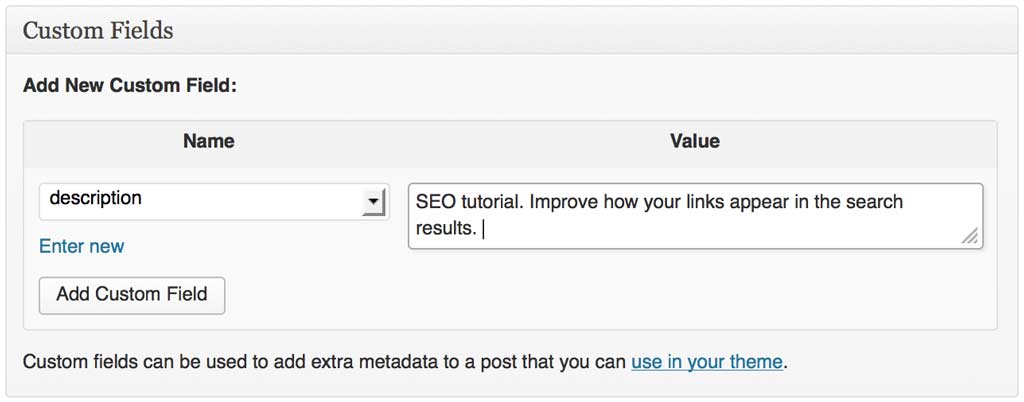
So, let’s create a key/value pair by typing it into the form as shown below. The name of my key will be description, and for its value I’ll type in the meta description I want to use for my post:
Now that we have the content of our new meta description for our post, all that’s left to do is call our meta key up and use its value in our page. Place the following code within the
tag in your template’s header.php file:<meta name="description" content="<?php echo esc_attr( get_post_meta( $post->ID, 'description', true ) ); ?>" />
This is it. The HTML code for your page will now look like this:

And this is how the link will appear in Google search results:

The meta description covers one line of a search snippet. For the fields that shape how a page looks when it’s shared and how search engines understand it — Open Graph tags, canonical URLs, and structured data — see the follow-up post, Better SEO, Part 2: Open Graph, Canonical URLs, and Structured Data without Plugins.